Market & visitors
Open the right panel before upgrading.
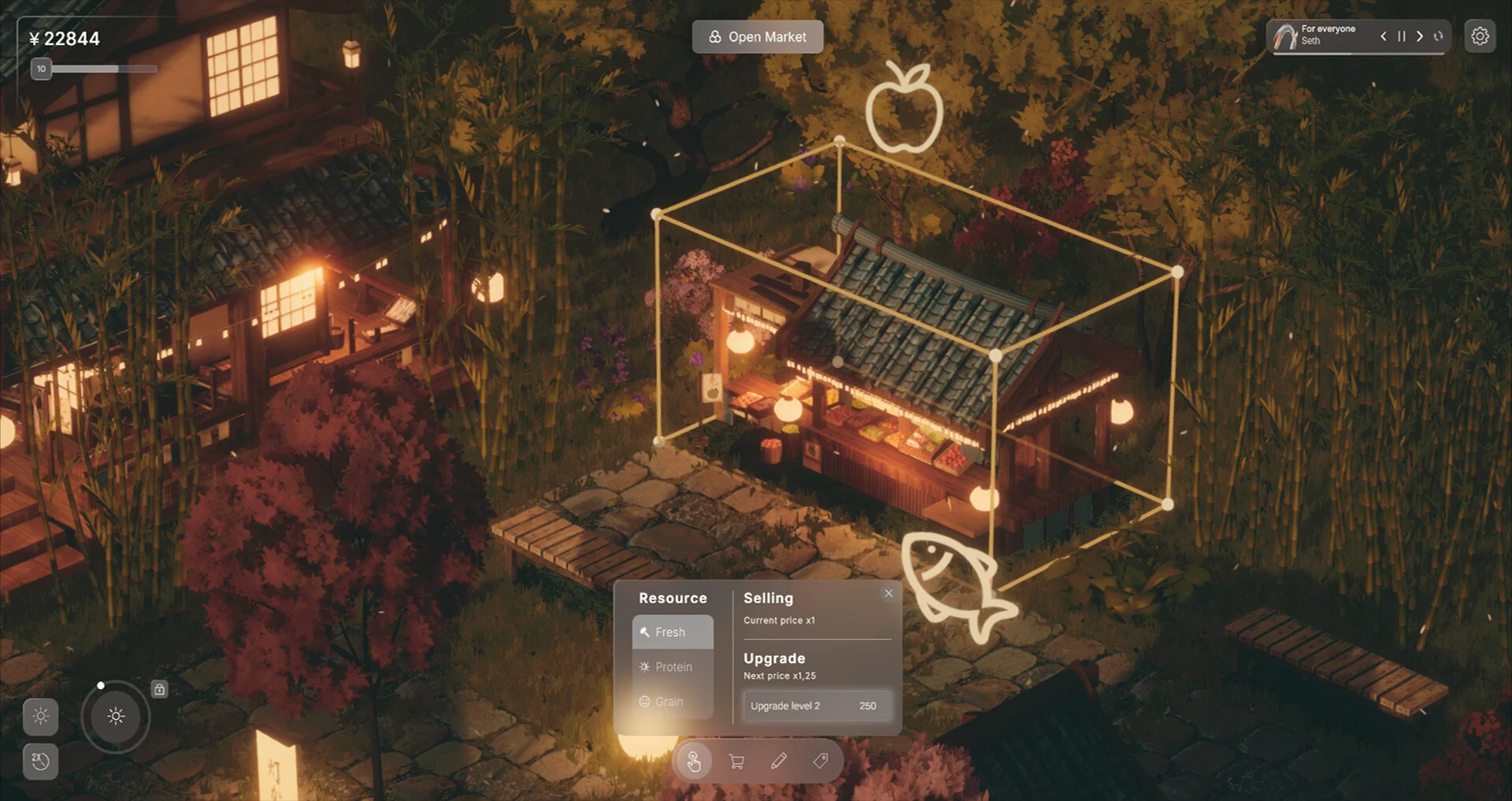
While preparing the market, switch to Select mode, then click the gate, building or stall you want to inspect. The reviewed Demo tutorial says this opens its panel and available upgrades. For a stall, compare Selling with Upgrade, including the next value and the cost shown on its button. A stall looking unchanged after an upgrade is not, by itself, proof the upgrade failed.
Checked November 3, 2026. The panel route is visible in September24 Demo footage. The developer’s November1 statement about added level numbers does not establish that every current Demo build has those numbers. These are sourced instructions and decisions, not our own gameplay test.
On this page
Recognize the selected stall panel
Find the object’s management panel
- Return to closed-market preparation if you are currently in the open market.
- Choose Select on the bottom toolbar, rather than the shopping-cart placement tool or Delete.
- Click the actual gate, building or stall. The tutorial at3:50 describes this selection route.
- Read the panel for that object. At4:10 the selected stall shows resource choices, a current selling value and a separate next-upgrade offer.
If a click places another object, you are still in placement mode. If it removes the target, stop using Delete and return to the safe tool-mode checks. Do not remove and rebuild an upgraded stall simply because its panel is hard to find.
Compare the effect before spending
| Panel information | What it answers |
|---|---|
| Resource: Fresh / Protein / Grain | Which resource is selected; it does not establish that supply exists. |
| Selling: current price | The selling-side value currently displayed for that stall. |
| Upgrade: next price and button cost/level | The offer for the selected stall, to compare with its current value and your available currency. |
Read your own panel instead of copying an old recording’s numbers. Different objects, levels and builds may show different offers. If you choose to upgrade, use its labelled button, then inspect the panel again for the resulting level or current value. The selected source frames establish the panel and offer, not a measured before-and-after income test.
A stall’s selling upgrade and a production building’s output are different checks. If the problem is zero stock, confirm matching production first. This page supplies no optimal upgrade order, payback calculation or claim that selling upgrades generate missing resources.
Pink Alpaca Plays · September 24, 2026 · Older Demo footage; playing connects to YouTube.
Why the upgraded stall may look the same
Demo players asked for extra food, lighting and ornaments to make upgrades visible. The developer welcomed those suggestions; on November1, TheLaba said a small number had already been added to show building upgrade level, while additional ornaments remained an idea.
That is not a promise of a new model or decoration at each level, nor proof the number was distributed to your Demo. Use the selected panel’s values or any level indicator actually present in your build. A visually identical roof is not enough to judge whether the upgrade registered.
If the panel or upgrade does not change
- No panel: verify Select mode, then click the intended object again.
- Cannot afford the displayed offer: compare your available currency with that particular button, rather than an old video’s price.
- No model change: inspect values/level before assuming failure.
- Currency was spent but the panel remains unchanged: record the exact object, before/after values, button offer and splash-screen build number for the developer feedback thread. The cited sources do not establish a universal repair.
- The stall is upgraded but empty: follow the producer/resource branch; do not repeatedly upgrade to repair missing supply.
What you should be able to compare
You can open the correct object panel, distinguish resource choice from the selling upgrade, and use its actual values instead of appearance alone. If an upgrade result remains unclear, you have the specific before/after information needed to describe it.
Sources & version
- Pink Alpaca Plays: tutorial at3:50 and stall panel at4:10, selected frames ↗
- November1 developer reply: level number added; ornaments suggested ↗
- Demo players’ requests for visible stall upgrades ↗
- Developer: producing resources and selling them are separate steps ↗
No exact present price, production rate, successful upgrade test or optimal economy is claimed.